Sent on March 6, 2026
There’s something I’ve long wished CloudCompare could easily do… but it can’t. This week, I whipped up a solution and shared it here.
I’ve wasted many hours loading giant point clouds into CloudCompare just to subsample them. The worst offenders are 10 GB+ site point clouds.
If you’re not familiar with subsampling, there are two primary methods:
Random (fast): Eliminates points randomly to achieve a target, like 20 million points.
Spatial (slower): Points within a specified distance of each other are removed.
I decided to create a program, with the assistance of some AI tools, that skips the loading step and gets straight to subsampling, saving a lot of time when you’re working with huge point clouds. Just as importantly, the program doesn't hog resources as it's working, so you can let it run in the background and go about your business.
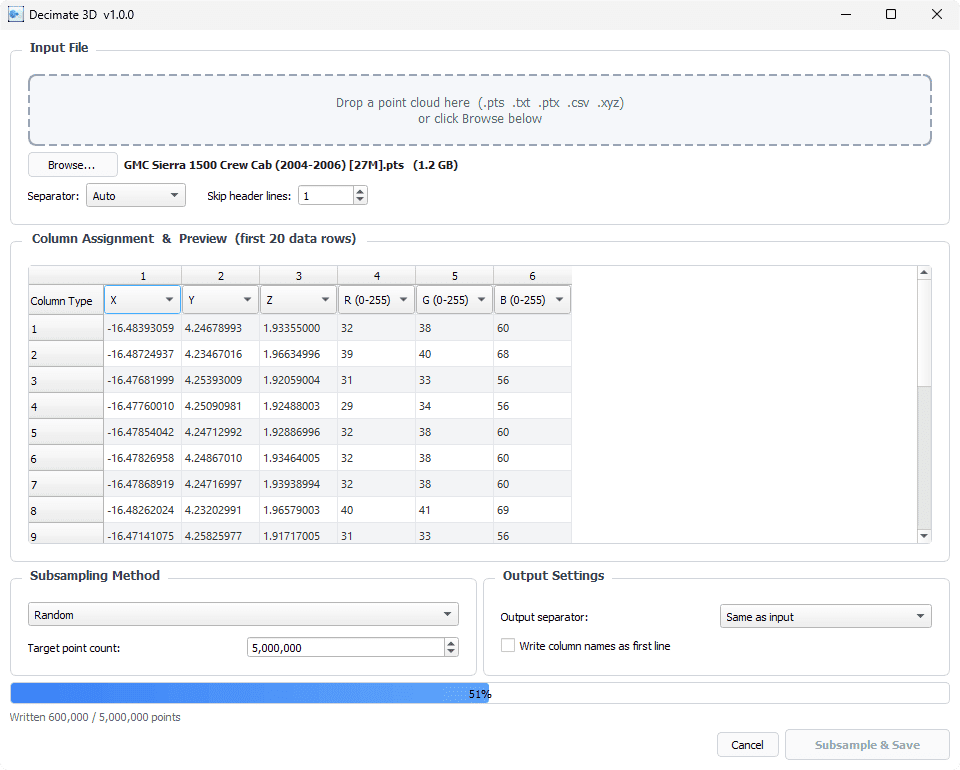
Here's how it works:
Import your point cloud by dragging + dropping or browsing
Assign definitions to each column of data
Choose your subsampling method (random, spatial voxel, or spatial nearest neighbor)
Specify the point count target or minimum distance
Press Subsample & Save
You can download the program, dubbed Decimate 3D, for free here. I've tested it, and it works perfectly so far. However, please verify the results prior to using it on a case.
Hopefully this saves you some serious time. We’ve got better things to do than spend half an hour pruning colossal point clouds.
Thanks for reading, keep learning!
Lou Peck
Lightpoint | JS Forensics